Tarkle vs Air.inc: branded file sharing or an asset library
Air.inc vs Tarkle compares a creative asset workspace with client file sharing. Tarkle brings file transfers, file requests and a client portal together; Air's published pages focus on organizing and adapting creative assets.
Air product and plan pages checked November 2026.
What Air.inc is
Air's homepage describes it as an agent for creative tasks, with reviews and sign-offs in one place. Its Storing & Sharing page describes visual boards for browsing and organizing creative assets, including placing an asset on multiple boards without duplicating files.
Air's conversational search page says, “Describe what you're looking for in natural language and refine results as you go.” Its Canvas page describes editing and adapting designs; Air's help article says Canvas is supported on any Air plan.
What Air.inc offers
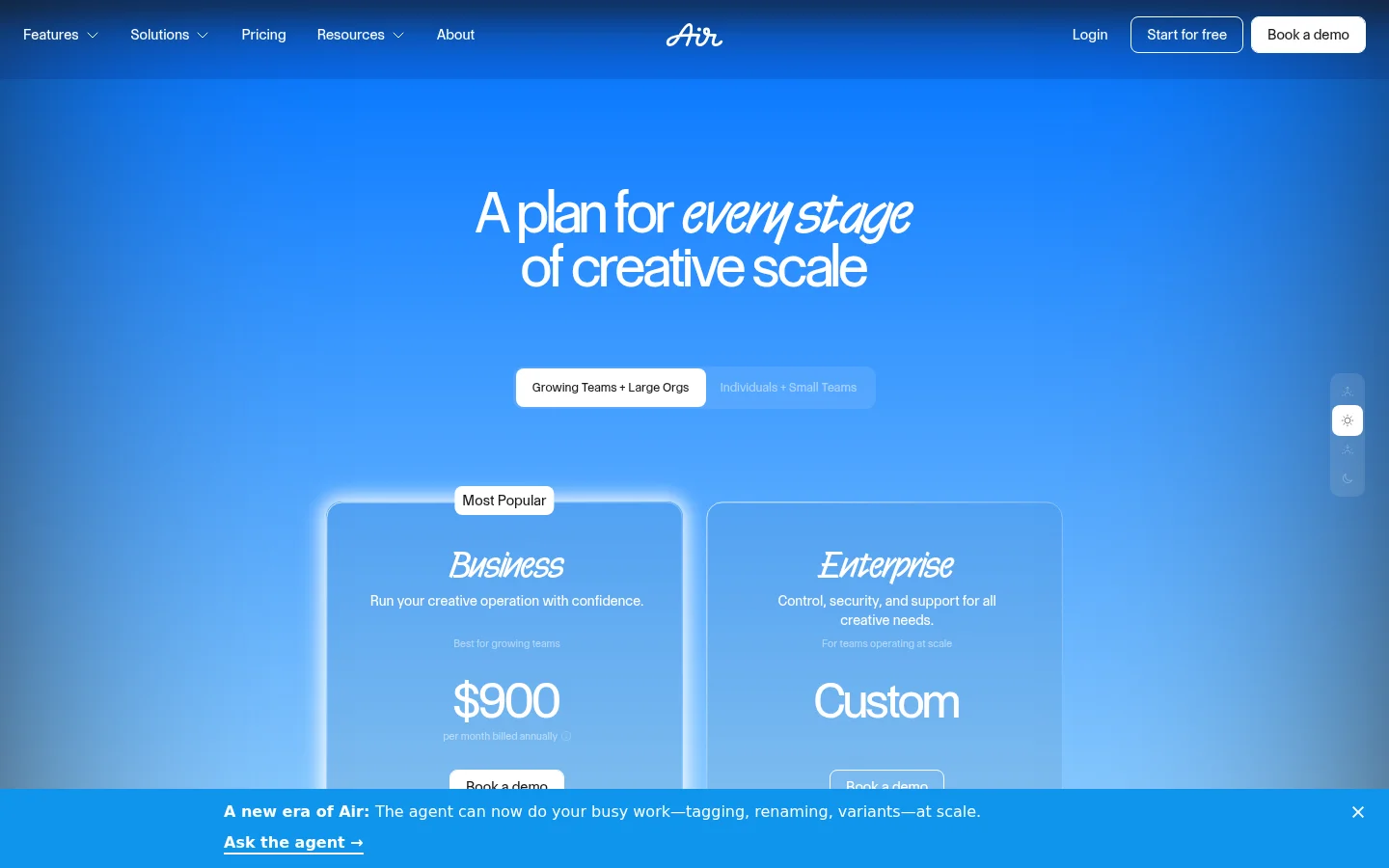
Air lists Free, Starter, Business and Enterprise. The published plan details checked in November 2026 are linked in its pricing and plans article.
Free: $0 per year, 10 GB of storage, up to 3 users and 100 credits per month. Air's pricing page says the plan has no time limit and requires no credit card.
Starter: $125 per month or $1,200 per year, with 200 GB of storage, up to 5 users and 500 credits per month.
Business: $1,100 per month or $10,800 per year, with 2 TB of storage, unlimited users and 2,000 credits per month.
Enterprise: custom pricing, unlimited users and 4,000 credits per month.
Air's share links give access to a selected board, sub-board or asset without requiring workspace membership. The help page says share links do not accept uploads. For incoming files, Air offers separate Content Collection forms, which let contributors upload without an Air account.
What Tarkle does
Tarkle gives client-facing businesses file transfers and file requests in one product. Transfers can have a password and an expiry date, and file requests let you ask clients to send files back.
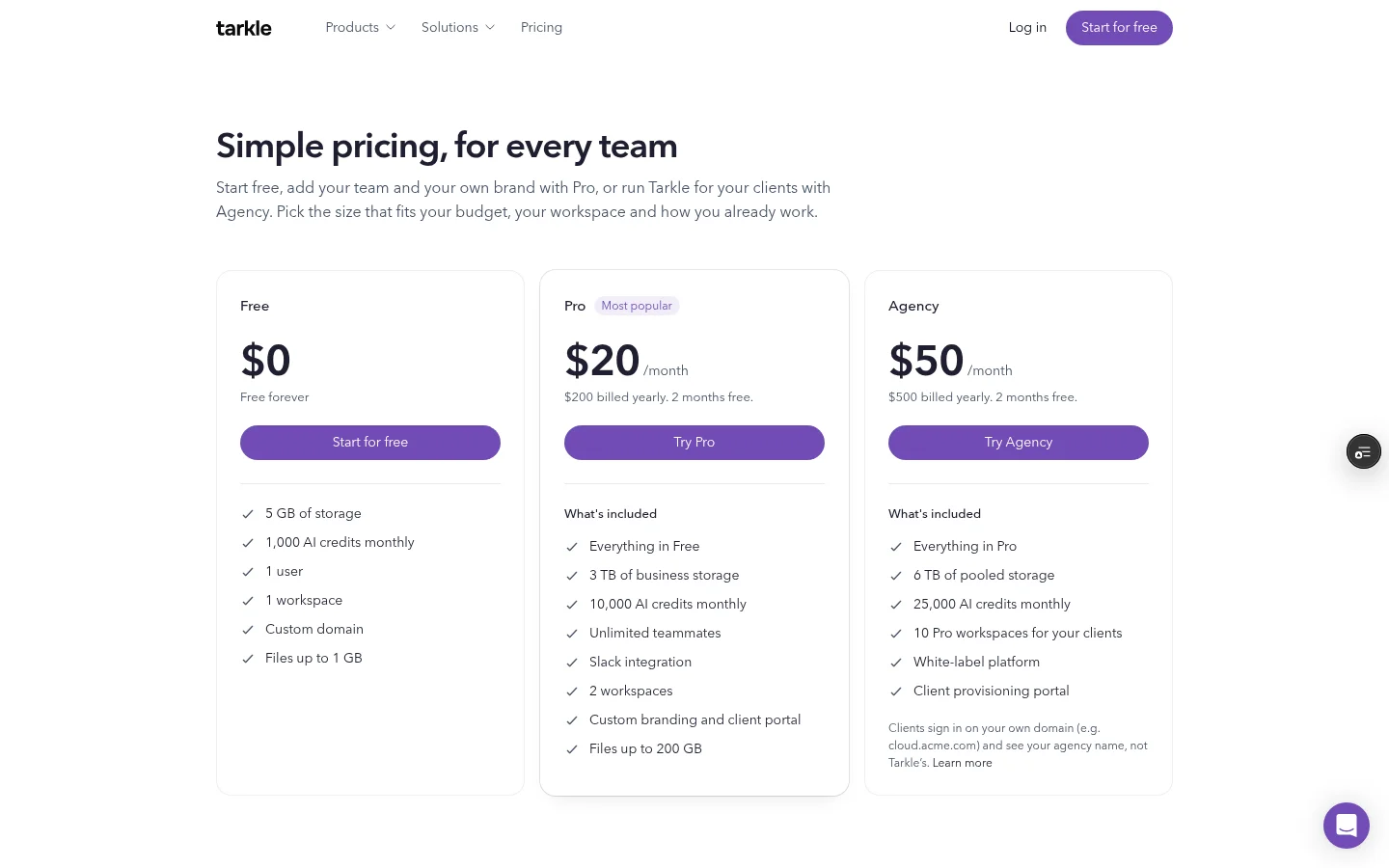
The Free plan includes 5 GB of storage, one user, one workspace and files up to 1 GB. Pro costs $20/month. Yearly billing is $200. Pro includes 3 TB of business storage. It covers files up to 200 GB and includes two workspaces, custom branding and a client portal. Agency costs $50/month. Yearly billing is $500. Agency includes 6 TB of pooled storage and 10 workspaces for clients. See Tarkle's plans and pricing for plan details.
Pro and Agency include a client portal. Portal access requires an eligible plan and the workspace's portal setting to be enabled; the individual contact's portal access must also be enabled. In the portal's Files view, shared files appear alongside files and folders the client uploads. The client portal guide shows the client-facing view.
Agency adds a white-label platform. Branding replacement applies when the organization is active, its Agency plan is in force and White label is enabled. Clients sign in on your domain and see your agency name instead of Tarkle's.
Air.inc vs Tarkle
Work | Client file sharing | Creative asset workspace |
|---|---|---|
Outgoing links | File transfers with password and expiry controls | Share links for boards, sub-boards or assets |
Incoming files | File requests and portal uploads | Content Collection forms, separate from share links |
Ongoing access | Client portal for shared files and client uploads | Share links to selected boards, sub-boards or assets |
Free plan | 5 GB, one user | 10 GB, up to 3 users |
Why teams use Tarkle for client sharing
A client exchange can include both a delivery and a return. A file transfer shares work with a client, and a separate request brings files back. For ongoing access, the client portal puts shared material and client uploads in the same Files view.
For agencies, Agency combines pooled storage with 10 workspaces for clients under one organization. White label puts the agency name on the client's sign-in when the organization is active, the Agency plan is in force and the setting is enabled. Pro combines custom branding and a client portal.
Test both directions with one client: send a file transfer, then ask for a file back with a request. For ongoing access, check the portal with the workspace setting and that contact's access enabled.
Moving client sharing from Air.inc to Tarkle
List the creative assets your team still organizes in Air and the client files you plan to share or collect through Tarkle.
Test the handoff with a file transfer and a separate file request.
If a client needs ongoing access, enable the portal for that workspace and enable access for the contact.
On Agency, organize client work in one of the 10 client workspaces.
Move one client at a time. Test an outgoing transfer and a file request with that client before changing the rest of the process.
FAQ
Does Air have a Free plan? Yes. Air lists Free with 10 GB of storage, up to 3 users and 100 credits per month. Its pricing page says Free has no time limit and requires no credit card.
Can Air share links collect files? No. Air says share links do not include uploads; its separate Content Collection form lets contributors upload without an Air account.
Does Tarkle include a client portal? Pro and Agency include the client portal. The workspace setting and each contact's portal access must be enabled.
What can clients see in the portal? The Files view includes files shared with the contact and files and folders the client uploads.
How many client workspaces does Agency include? Agency includes 10 client workspaces and 6 TB of pooled storage.
What does Agency white label change? When enabled for an active Agency organization, the client's sign-in shows your agency name on your domain.
What to remember about Tarkle
Tarkle combines client file transfers, file requests and an ongoing portal, with custom branding on Pro and a white-label platform on Agency. Start for free to test a file transfer with a client.