Tarkle vs Clinked: branded sharing or client workspace
Tarkle lets client-facing teams share branded file links. It lets you request uploads. Its feedback boards let clients review images and PDFs. Clinked brings files and collaboration into branded spaces for clients, teams and partners.
What Clinked is
Clinked describes itself as a secure, white-label collaboration platform for files, communication, tasks and document approvals in branded spaces. Its pricing page also lists Client Portals and a Virtual Data Room.
What Clinked offers
Clinked's pricing page, checked in June 2026, displays monthly, yearly (20% off) and two-yearly (35% off) billing. Standard is listed at $239 per month. The plan includes 100 members and 1 TB of storage, with tasks, a shared calendar, discussions, real-time group chat, an audit trail and a dedicated account manager.
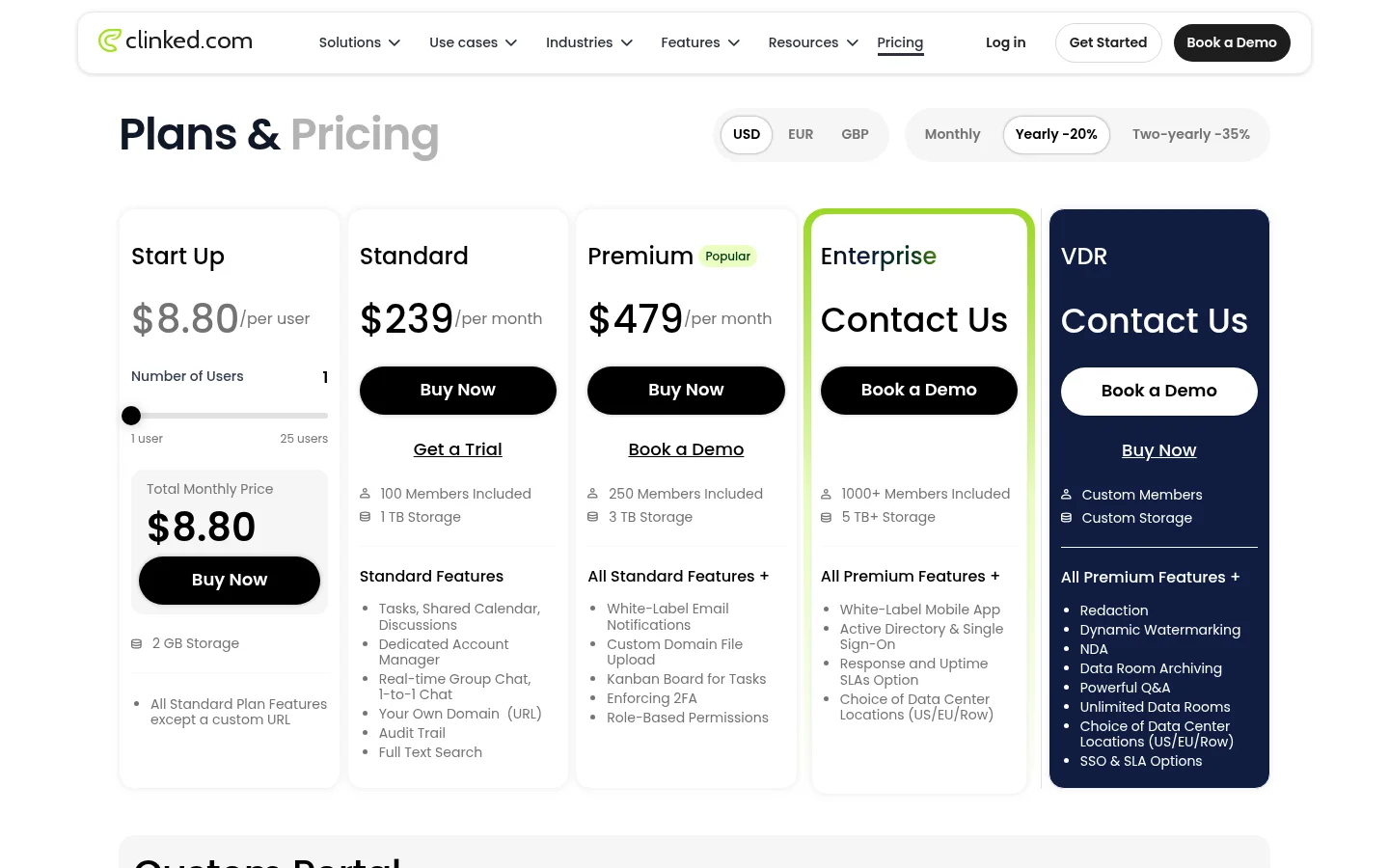
The Premium plan card lists $599 per month; the pricing comparison area lists $479 per month. Both show 250 members and 3 TB of storage. Premium lists white-label email notifications, custom-domain file upload, a Kanban board for tasks, enforced 2FA and role-based permissions. Enterprise is listed as contact sales, with 1,000+ members and 5 TB+ of storage. Start Up is listed at $11 per user with 2 GB of storage; the page says it includes Standard features except a custom URL.
Clinked's client portal page describes a private workspace for each client. Its Guest Share page says external users can open shared files and folders without creating a full account. It also lists permissions, passwords and expiry dates. The pricing comparison lists File Request and File Approval. Clinked's File Uploading page says uploads have “no limit to file sizes.”
What Tarkle does
Tarkle gives you a branded file sharing link for delivery. For incoming material, request files into a folder you choose. The client feedback feature gives clients a review board to comment on images and PDFs; they can approve or request changes.
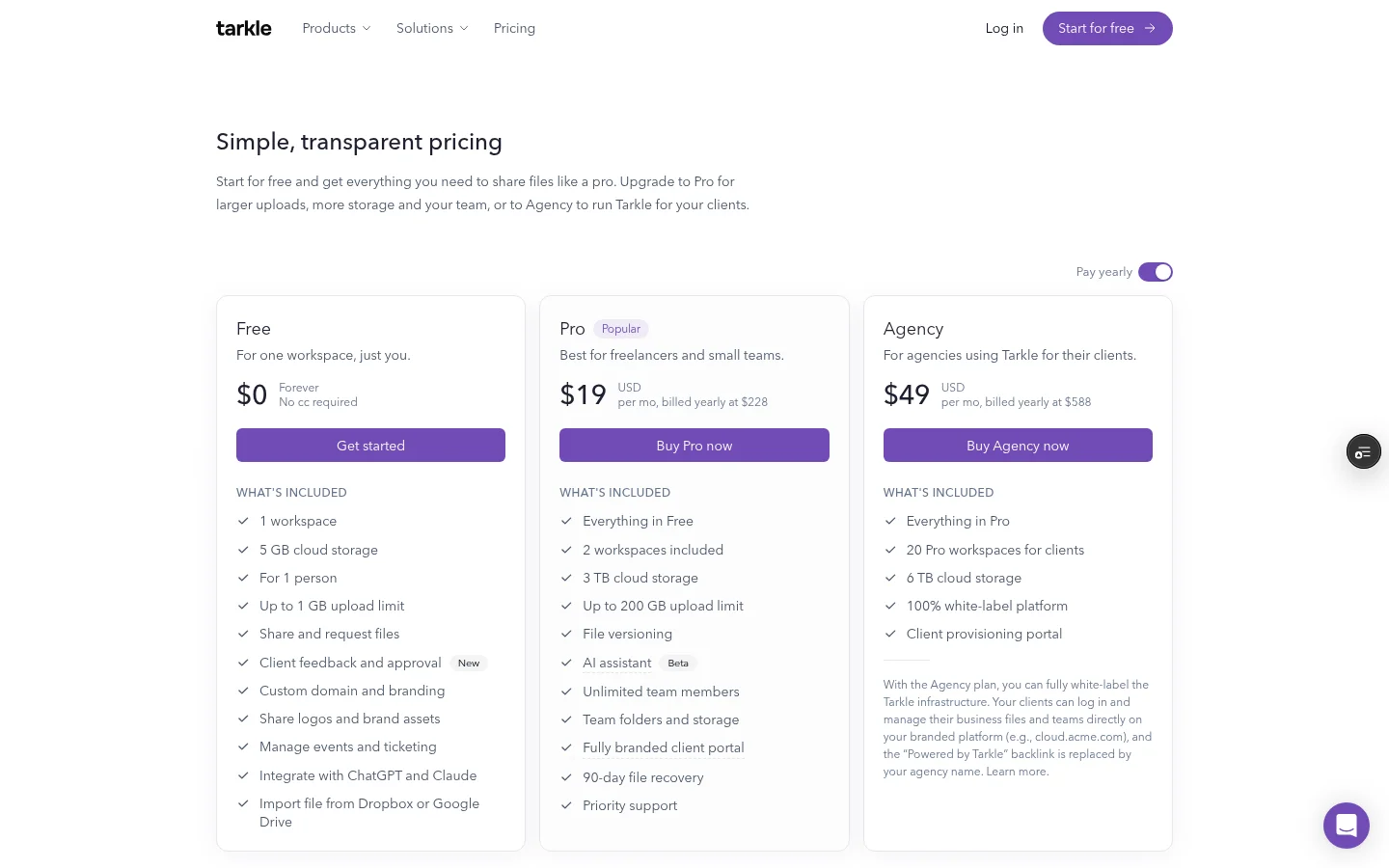
The client portal is included on Pro and Agency. Its Files view includes files shared with a contact and files the contact uploads; the upload folder itself is not listed. Workspace portal availability depends on the workspace setting, and the contact needs portal access enabled. See how the client portal works for access details.
Free includes a custom domain. Pro includes custom branding and a client portal. Agency includes 10 workspaces for clients and a white-label platform. Replacing Tarkle with your agency name requires an active Agency organization with White label enabled. See custom branding and white label for agencies for the distinction.
Plans belong to the organization. Free is $0, with 1 workspace and 5 GB of storage. Pro is $20 monthly or $200 yearly, with 3 TB of storage and 2 workspaces. Agency is $50 monthly or $500 yearly, with 6 TB of pooled storage and 10 workspaces for clients. Files can be up to 1 GB on Free and 200 GB on Pro and Agency. Compare the plans and prices for full details.
Clinked vs Tarkle
Area | Tarkle | Clinked |
|---|---|---|
Main workflow | File delivery, requests and feedback | Files, communication, tasks and document approvals in branded client spaces |
Client space | Client portal | Private workspace for each client |
File requests | Requests on all plans | File Request listed in pricing comparison |
Client review | Feedback boards for images and PDFs | File Approval listed in pricing comparison |
Clinked's pricing page lists tasks, a shared calendar, discussions and chat alongside files. The linked feature pages above describe Tarkle's file delivery, requests and client review. Use the vendor pages to compare the functions and plan conditions that matter to your team.
Why teams choose Tarkle for branded file sharing
When you need to deliver a finished file, a branded link gives you a clear way to share it. When you need something back, a file request sends the upload into the folder you choose. Feedback boards collect comments and approvals on images and PDFs, while the client portal brings together shared files and files a contact uploads.
Free includes file sharing and file requests. Free also includes 5 active feedback boards. Your organization holds the plan.
Switching from Clinked to Tarkle
Start by listing the files and client access you want to recreate. Add files to a workspace by uploading them or importing from Google Drive or Dropbox. Then set up the branding and domain for the pages clients use.
Send a branded file link for delivery. Create a file request for incoming documents. When clients need a portal, enable it for the workspace. Each contact also needs portal access enabled.
Move one client first. Send a file and request the next material you need, then check the folder and portal access before repeating the setup.
FAQ
Is Tarkle an alternative to Clinked?
Tarkle offers branded file delivery, file requests, client feedback and a client portal. Clinked's published pages describe a shared client workspace with files and collaboration features such as tasks, chat and a calendar. Compare the workflows and plan details against the work your clients need to do.
Can Clinked guests open shared files without an account?
Clinked's Guest Share page says external users can open shared files and folders without creating a full account.
Can I use my own domain with Tarkle?
A custom domain is included on Free. Pro includes custom branding. Pro can remove “Powered by Tarkle” on your own domain. Agency's white-label replacement applies when the organization is active on Agency and White label is enabled.
Does Tarkle have a client portal?
Yes. The client portal is included on Pro and Agency. Workspace availability depends on its setting, and each contact needs portal access enabled. The Files view includes shared items and the contact's own uploads.
How big a file can I send with Tarkle?
Files can be up to 1 GB on Free and up to 200 GB on Pro and Agency. Clinked's File Uploading page says its uploads have no file-size limit.
Can clients approve work in Tarkle?
Yes. Feedback boards let clients comment on images and PDFs and approve or request changes. Free includes 5 active feedback boards.
Try branded file sharing with Tarkle
Compare plans, then start for free.