Tarkle vs Google Drive for branded client file sharing
Google Drive client file sharing brings online storage, links and collaboration together. Tarkle adds branded file transfers, file requests and a client portal for businesses sharing work with clients.
Last checked: November 2026.
What Google Drive is
Google describes Drive as cloud storage for sharing and collaboration. Its product page says people can upload, open, share and edit files from any device, and that teams can collaborate in real time. It also describes editing and organizing Google Docs, Sheets and Slides in real time (Google Drive product page, checked November 2026).
What Google Drive offers
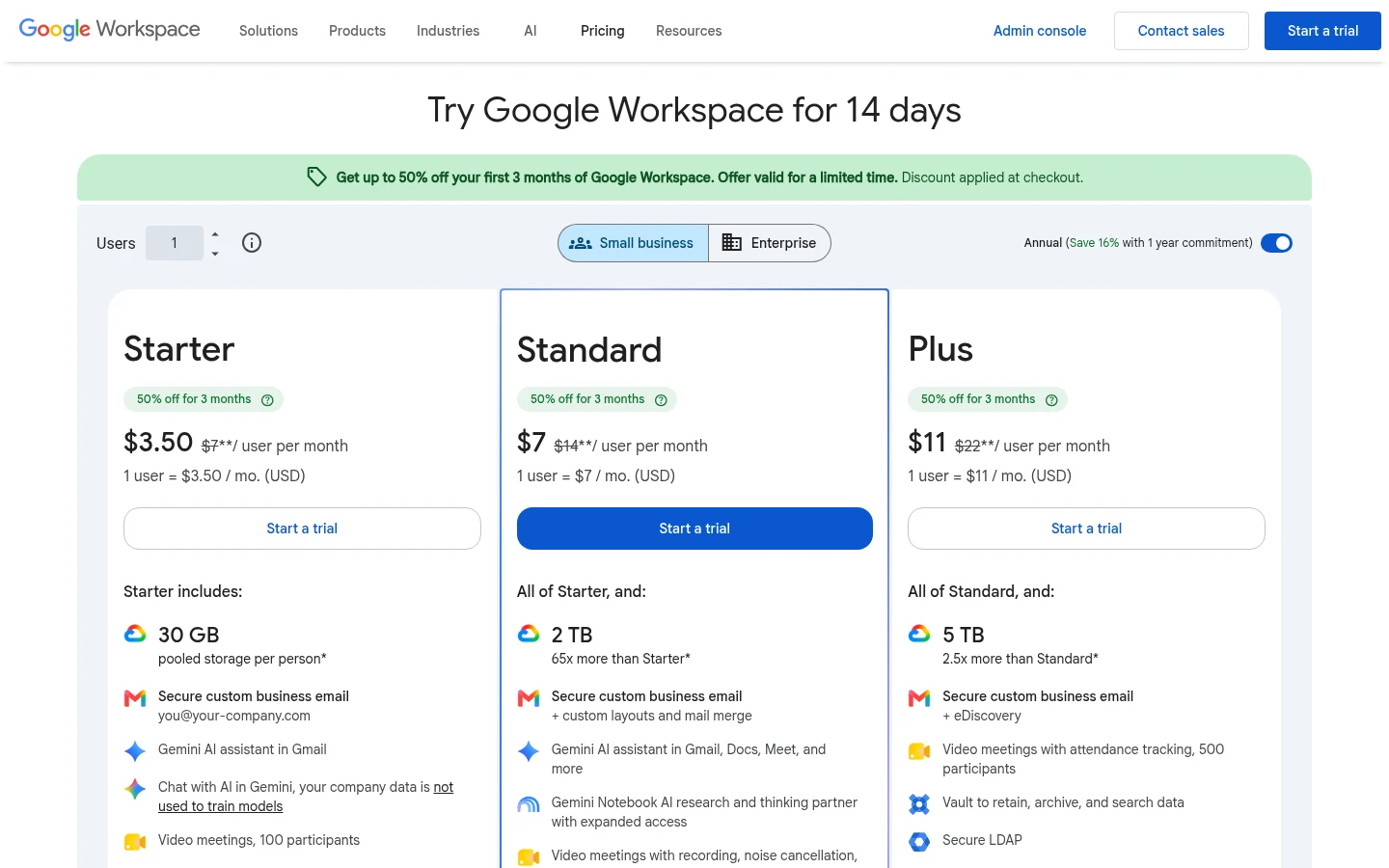
Google Workspace plans use per-user monthly pricing. The pricing page lists Business Starter with 30 GB pooled storage per user, Standard with 2 TB, and Plus and Enterprise Plus with 5 TB (Google Workspace pricing, checked November 2026).
Google Drive lets a sender assign Viewer, Commenter or Editor access. Its sharing guide also describes an “Anyone with the link” setting, which lets anyone with the link open a file without signing in to a Google Account. For work or school accounts, administrators may restrict external link sharing (Google sharing guide, checked November 2026).
Google documents access expiration for work or school accounts, with a date within one year. Folder expiration is available for Viewer access. For individual files, Google lists a maximum of 5 TB for “all other files”; Google Docs, Sheets and Slides have separate limits on its file size help page, checked November 2026.
Workspace administrators can add an organization logo to some Google service pages, including Drive, but Google says the logo is visible only to users within the organization. Google also documents custom service URLs; when a user opens one, the browser displays the original Google Workspace service URL. The logo instructions and custom URL instructions were updated in November 2026.
Google's Activity dashboard help describes view history for Docs, Sheets and Slides in work or school accounts. People can turn off their own view history in its privacy settings (Activity dashboard help, checked November 2026).
What Tarkle does
Tarkle brings file sharing and file requests together for client-facing work. Use file sharing to send files with branding, and file requests to collect files into your workspace.
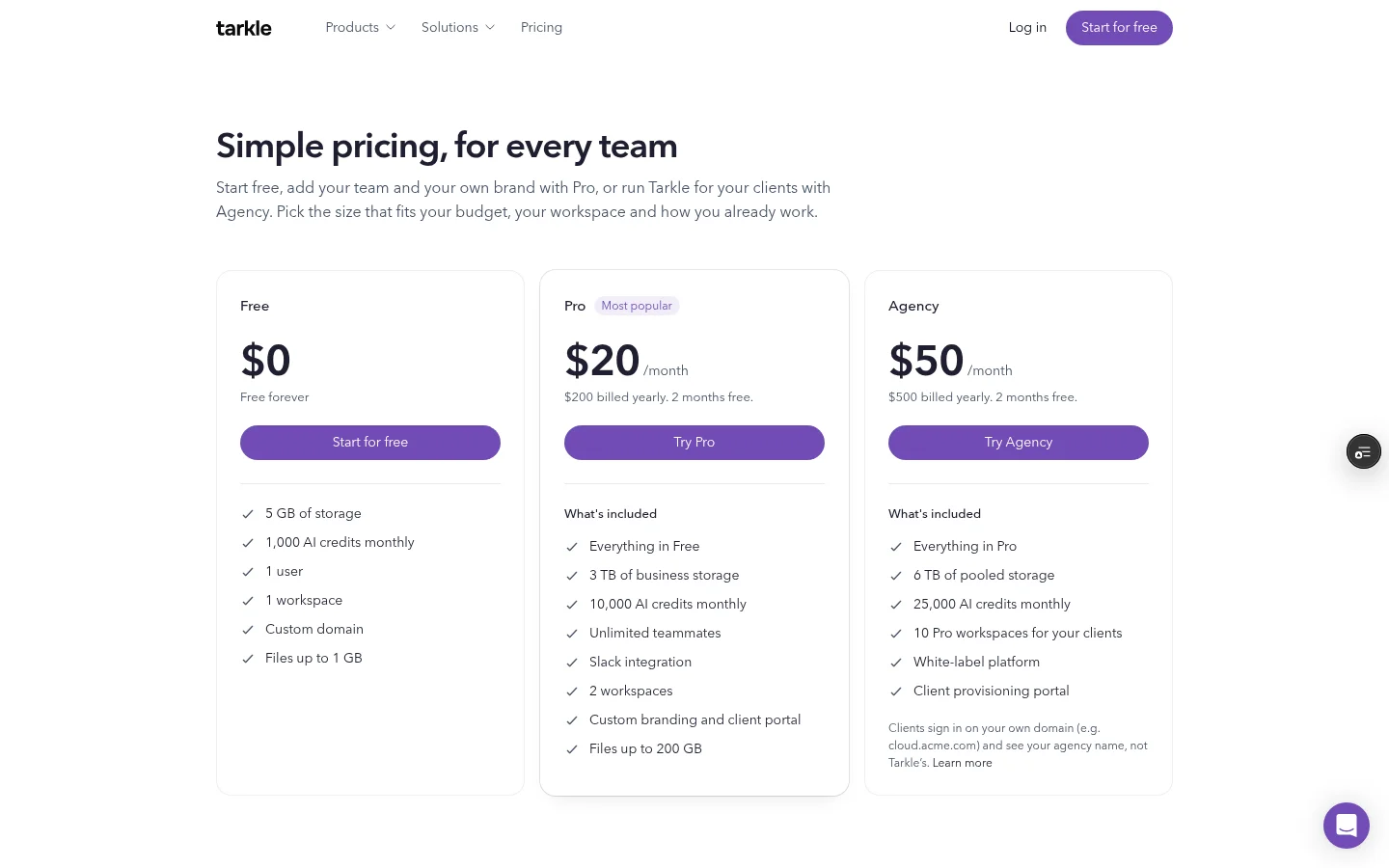
Free is $0. Pro is $20 per month or $200 billed yearly, and Agency is $50 per month or $500 billed yearly. Plans belong to the organization. Free supports files up to 1 GB; Pro and Agency support files up to 200 GB. See Tarkle pricing for plan details.
Pro and Agency include custom branding and the client portal. Pro can remove “Powered by Tarkle” on the organization's own domain. Agency adds a white-label platform and 10 workspaces for clients. Agency clients sign in on the agency's domain and see the agency name instead of Tarkle's, as described on the Agency white-label page.
In the portal's Files view, clients can see files and folders shared with them alongside the contents of their own upload folder. The client portal help article explains what a contact can see and upload.
File transfers can use a password and an expiry date on Free, Pro and Agency. Transfer status shows whether a transfer was delivered, viewed or downloaded.
Google Drive vs Tarkle
Area | Tarkle | Google Drive |
|---|---|---|
Pricing model | Organization-level plans. | Per-user monthly pricing. |
Storage | 5 GB on Free, 3 TB pooled on Pro and 6 TB pooled on Agency. | 30 GB pooled per user on Business Starter, 2 TB on Standard, and 5 TB on Business Plus and Enterprise Plus. |
Largest file | Up to 1 GB on Free and 200 GB on Pro and Agency. | Up to 5 TB for other files; Google Docs, Sheets and Slides have separate size limits. |
Client branding | Pro includes custom branding and can remove Powered by Tarkle on the organization's own domain. Agency adds a white-label platform, with clients signing in on the agency's domain and seeing its name. | Workspace logos on some Google service pages are visible to people within the organization. A custom service URL still displays the original Google Workspace URL. |
Sharing and expiry | Password and expiry dates are available on Free, Pro and Agency. | Viewer, Commenter and Editor roles; link sharing can be set to anyone with the link. Expiration is documented for work or school accounts. |
Client activity | Transfer status shows delivered, viewed or downloaded. The portal Files view includes shared files and the client's own uploads. | Activity dashboard view history covers Docs, Sheets and Slides in work or school accounts. |
Why teams choose Tarkle
For a branded client exchange, one link can carry your branding and a password or expiry date. Transfer status shows what happened after you sent it, while a file request gives a client a place to send files back. With the client portal, the Files view brings shared files and the client's own uploads together.
Before you move a project, list which files the client receives and what they need to send back. Then decide whether a branded transfer, a request link or a client portal matches that exchange.
Switching from Google Drive to Tarkle
Tarkle can copy selected files from Google Drive into your library without downloading them first. Start from Files, then use the Upload menu to open the Google Drive import flow. Once files are in your library, create a file transfer for delivery or a file request when you need documents back.
Import a small set first and check the copied files in your library before replacing links you have already sent to clients.
FAQ
Can a Google Drive link open without a Google Account?
Google's “Anyone with the link” setting allows anyone on the internet with the link to open a file without signing in. Work or school administrators may restrict external link sharing.
Can Google Drive links expire?
Google documents access expiration for eligible work or school accounts. The selected date must be within one year, and folder expiration is available for Viewer access.
Can clients upload files through Tarkle's portal?
Yes. The portal Files view includes the files and folders you shared with the client and the contents of that client's own upload folder. The client portal is included on Pro and Agency.
Can a Google custom URL brand a shared file link?
Google's custom service URL instructions say that the browser displays the original Google Workspace service URL when a user opens a custom URL.
What does Tarkle cost?
Free is $0, Pro is $20 per month or $200 billed yearly, and Agency is $50 per month or $500 billed yearly. Plans belong to the organization. Start for free.