Tarkle vs Playbook: branded sharing or a creative library
Tarkle helps teams share files with clients, collect files back and give clients a portal. Playbook describes itself as cloud storage for creatives, with visual search and image and video review tools.
What Playbook is
Playbook calls itself “cloud storage for creatives.” Its features page describes visual search with AI tags. Its collaboration tools let reviewers comment on areas of images and video frames. See the Playbook features page and collaboration page.
What Playbook offers
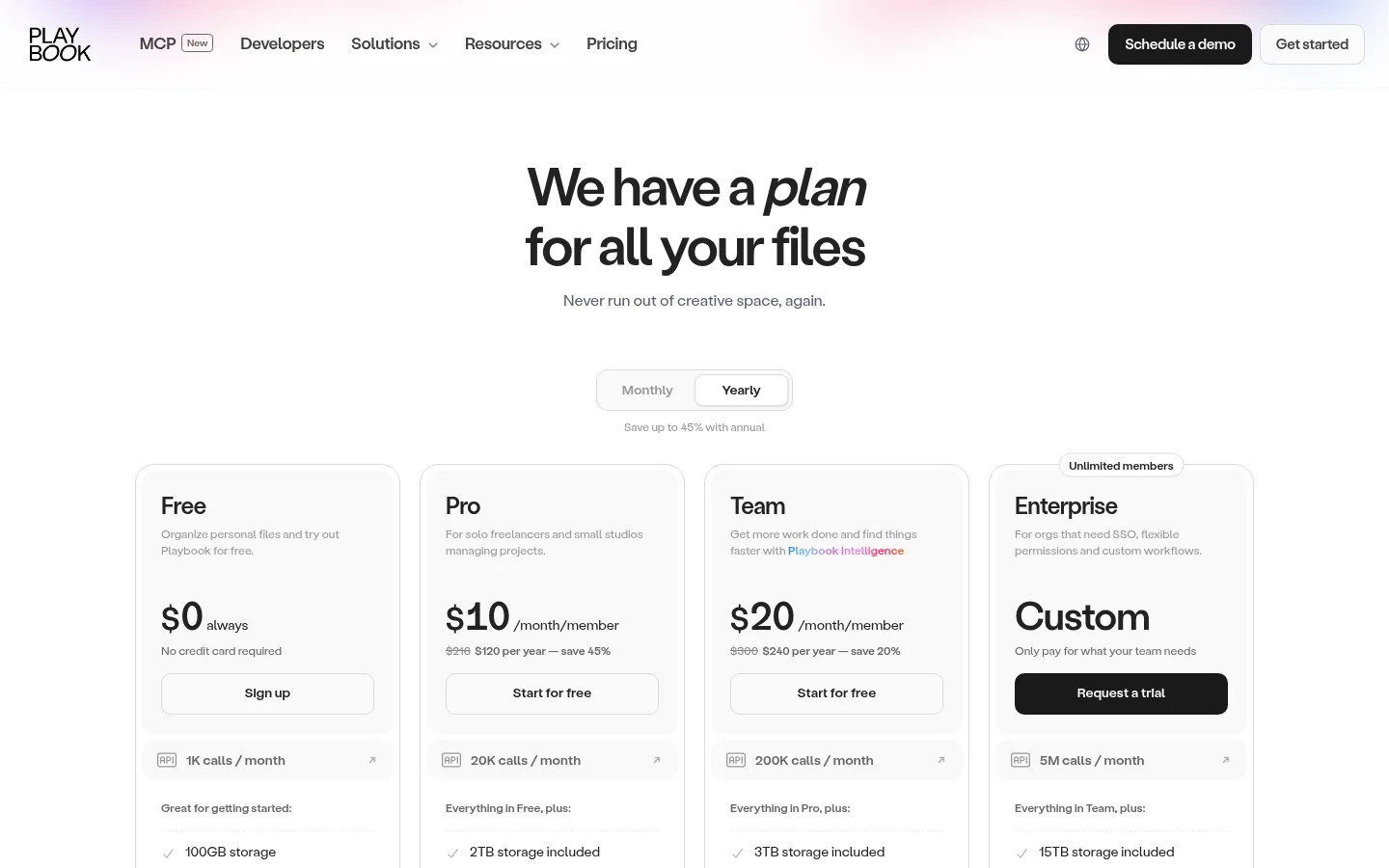
Playbook's pricing page, checked in November 2026, lists Free at $0. It provides 100 GB of storage or up to 300 assets. Free includes one member and three guests, one publish page and public share links. Pro lists $10 per member per month. Its yearly price is $120. Pro includes 2 TB plus 1 TB per added member and up to five members. Team lists $20 per member per month. Its yearly price is $240. Team includes 3 TB plus 2 TB per added member and up to ten members. Enterprise pricing is custom. See Playbook's plan details for the plan comparison.
The same page lists shared-link controls for downloads, passwords and email collection, and custom logo and branding on paid plans. It also lists AI tagging for images and videos, plus video frame scrubbing on Team and Enterprise. Playbook's public share links and publish pages sit alongside its library and review tools.
What Tarkle does
File sharing lets you send files and folders with a branded link. A File request collects files from anyone with one link, into the folder you choose. The client portal gives each client a branded place to sign in with their email.
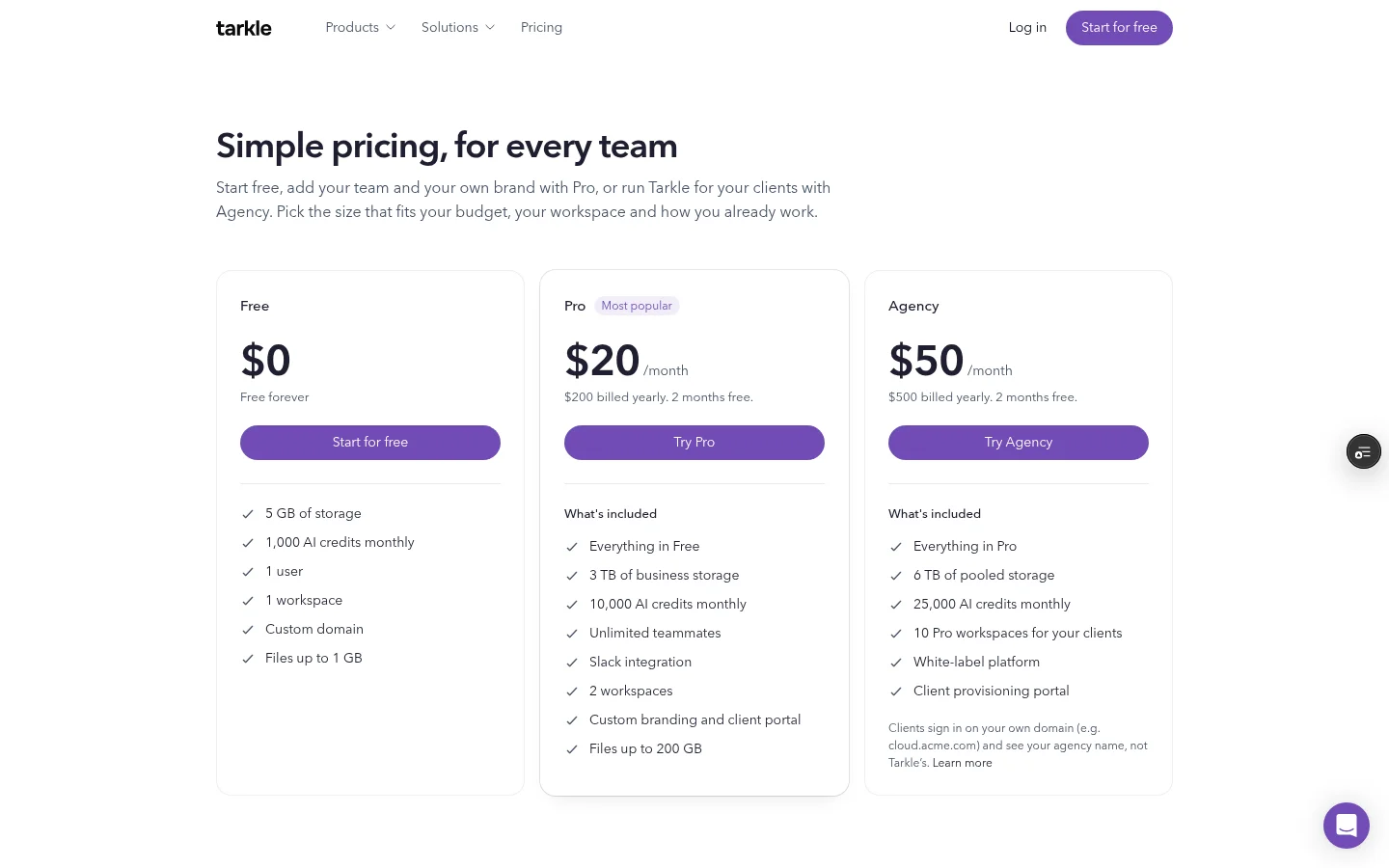
The Free plan includes file sharing, file requests, client feedback and approval. Pro includes custom branding and client portal access. Agency includes a white-label platform. See Tarkle's plans and pricing for plan details.
Public transfers can open without a Tarkle sign-in. Valid token links can also open without a sign-in. A transfer restricted to a client organization requires a signed-in client whose organization matches. Password or email gates can add an access step for outside visitors.
For a client to use the portal, the workspace portal setting must be enabled, and portal access must be enabled for that contact. Clients sign in with their email. The portal Files view includes what you shared with them and the contents of their own upload folder. The client portal guide explains the view and access.
Agency white label requires an active Agency organization with White label enabled. Clients can sign in on your own domain and see your agency name. The Powered by line can be hidden on your own domain; it remains on a Tarkle address, and some client portal emails may still say Powered by Tarkle. See the white-label setup guide.
Playbook vs Tarkle
What to compare | Tarkle | Playbook |
|---|---|---|
Main job | File transfers, file requests and portal access | Creative asset storage, visual search and collaboration |
Sharing | Branded file links and file requests | Public share links and publish pages |
Branding | Pro custom branding; Agency white-label platform | Paid custom logo and branding |
Review | Feedback boards for images and PDFs, with comments and approval | Comments on image areas and video frames |
Tarkle's feedback boards cover images and PDFs; Playbook lists video frame scrubbing on Team and Enterprise. For client file sharing, Tarkle connects outgoing transfers, incoming file requests and portal access.
Why teams use Tarkle for client sharing
When a client needs a file, send a transfer from the workspace Transfers page. When you need files back, create a request from Requests. A client feedback board lets a client comment on images or PDFs and respond with approval or a request for changes.
Free feedback boards have a limit of five active boards per workspace; Pro and Agency have no active-board limit.
Moving client files to Tarkle
Start with one active client exchange. The file transfer guide explains the three steps: choose your content, add a title and summary, then set access choices and create a transfer. A File request can collect the files you need returned.
Make a short client-by-client list of files to share and files still expected back. Move those active exchanges first, then decide which library assets belong in your client-sharing setup.
Frequently asked questions
Does Tarkle have a Free plan? Yes.
Does Playbook offer a free plan? Yes. Playbook's pricing page lists Free.
Can clients send files back through Tarkle? Create a File request link and choose the destination folder for incoming files.
What should I move first? Map active client exchanges: files to send, items expected back and any review decisions.
Can Tarkle review video frame by frame? Tarkle feedback boards are for images and PDFs. Playbook lists video frame scrubbing on Team and Enterprise.
Start with branded client sharing
If file transfers, file requests and client access fit the way you work, start for free.