Icedrive vs pCloud lifetime: plan status and fit

Icedrive vs pCloud lifetime is a comparison of published one-time plan status, storage sizes and features. Icedrive's public pages disagree about new lifetime sales, while pCloud publishes lifetime storage sizes. This guide separates lifetime plan details from features listed elsewhere on each provider's site.
Pages checked: November 2026.
Icedrive vs pCloud lifetime at a glance
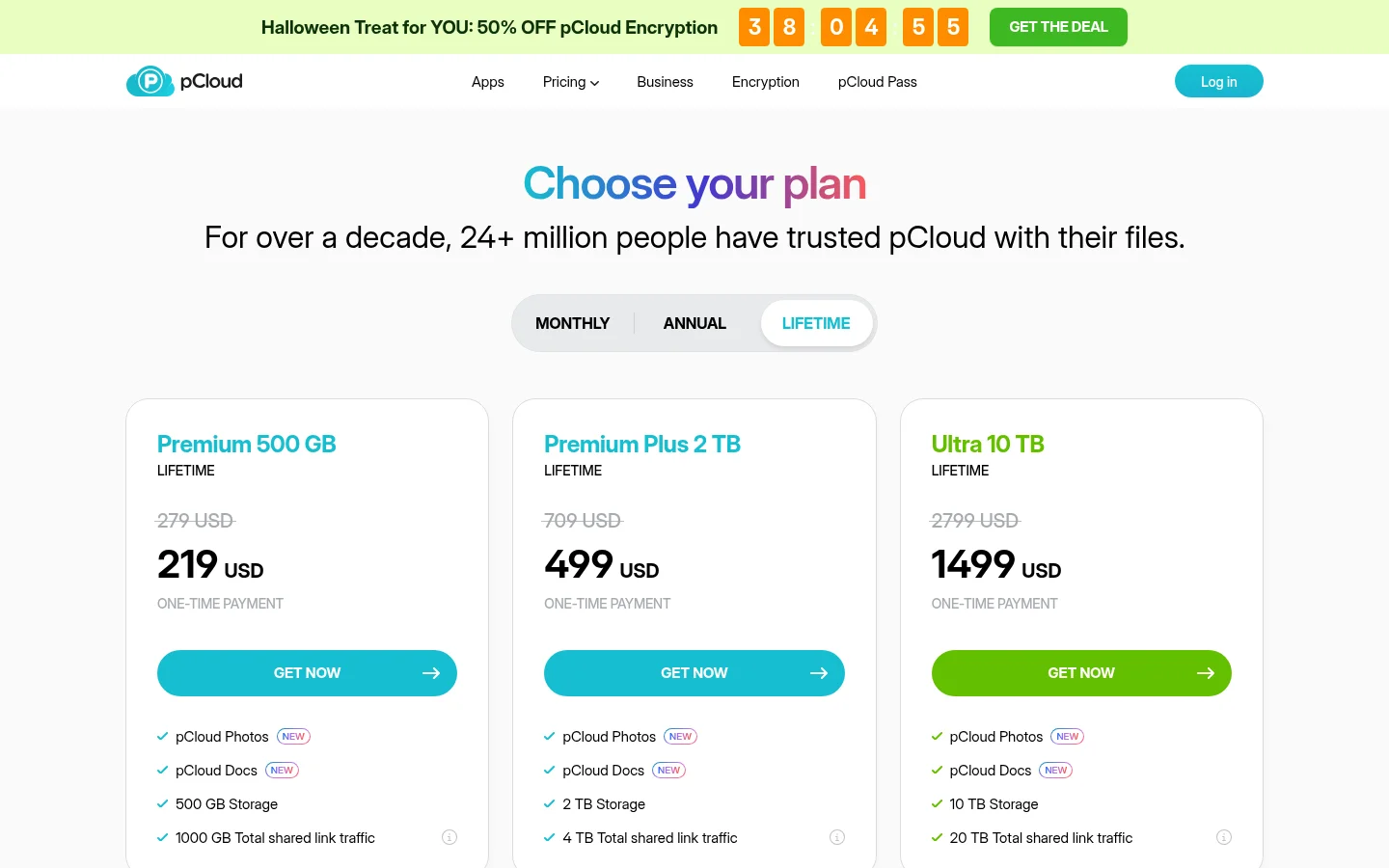
pCloud lists lifetime storage tiers of 500 GB, 2 TB and 10 TB. Icedrive's dedicated lifetime page says sales have ended, while its plans FAQ says one-time payments are still available. Since the two providers present different information about lifetime sales, compare the exact offer and terms displayed before making a decision.
What do Icedrive's lifetime pages say?
Icedrive's dedicated lifetime page says, “Lifetime plan sales have ended” and “We no longer sell new Lifetime plans.” Its plans page FAQ, however, answers yes to still offering lifetime plans and says one-time payments remain available. Those statements conflict, so they do not establish one clear answer about whether a new Icedrive lifetime purchase is available.
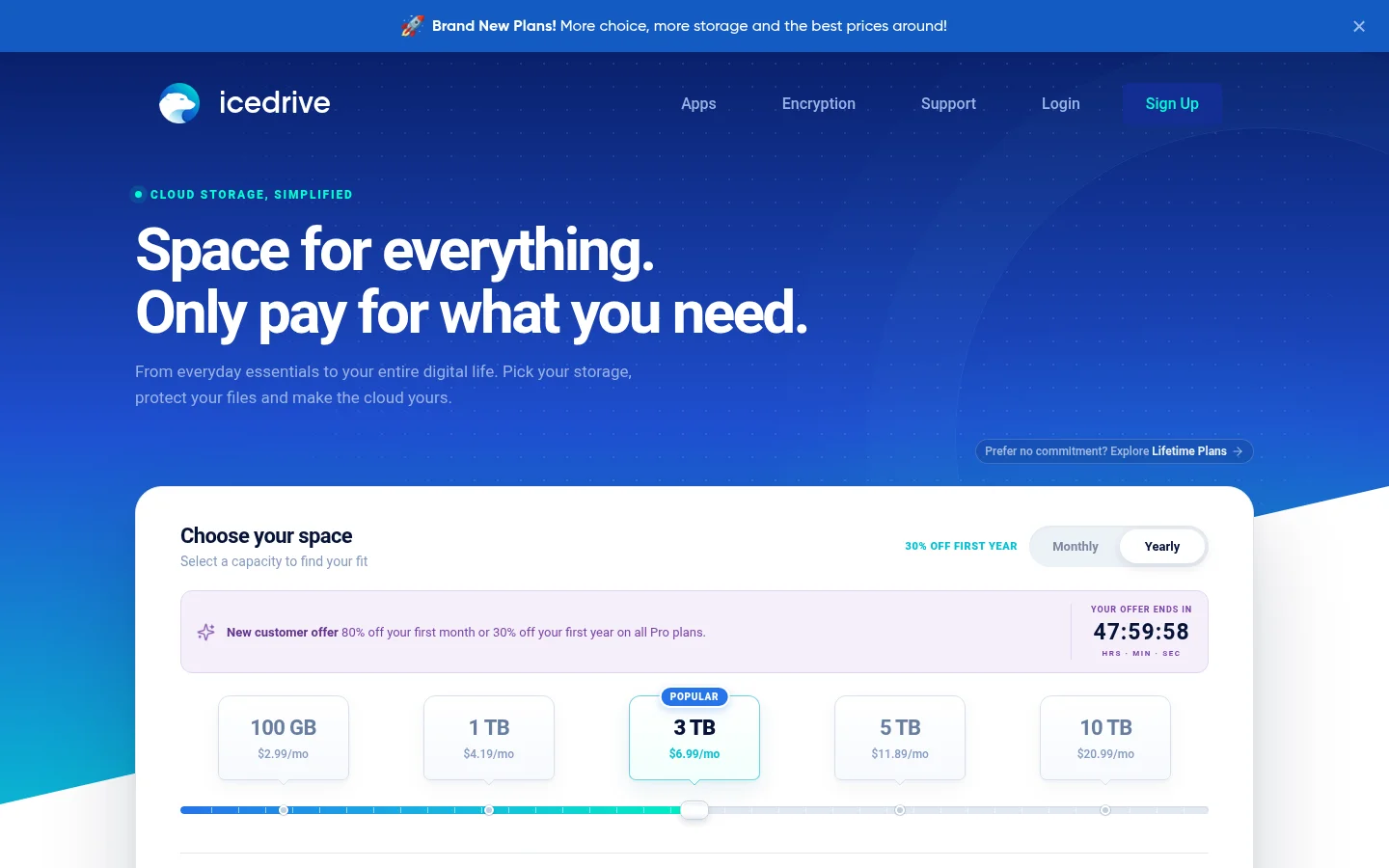
The dedicated lifetime page points readers toward subscriptions, while the FAQ still says one-time payments are available. That leaves an important buyer question: whether an Icedrive lifetime offer can be purchased, and what its terms are, needs to be checked against the exact offer presented before payment. Subscription details should not be treated as confirmed terms for a lifetime purchase.
Compare the feature list for the exact plan being offered. A subscription page does not establish what a lifetime purchase includes.
How does Icedrive handle encryption and desktop access?
Icedrive's plans page describes encrypted space protected with client-side Twofish encryption before files leave your device. Its desktop app page describes access to cloud storage as if it were a physical hard disk or USB stick. These are details published for Icedrive's service and desktop software, not confirmed lifetime-plan terms.
Icedrive's support page says sharing files in its encrypted space is not supported. That distinction matters when comparing encryption for stored files with encryption for files you need to send to others.
What sharing features does Icedrive list?
The Icedrive subscription plans page lists protected public links with passwords, expiry dates and download limits, plus folder collaboration and file requests. Those details describe its subscription plans, so they should not be assumed to apply to an Icedrive lifetime purchase.
Which lifetime sizes does pCloud publish?
pCloud's lifetime page lists lifetime storage plans with 500 GB, 2 TB and 10 TB. The page presents the tiers alongside other included product details. Read the feature list attached to the exact offer, rather than treating a feature on another plan page as automatically included.
pCloud's encryption page describes activating a Crypto folder where dropped files are encrypted on the device. Comparing this with Icedrive's encrypted space means checking two separate questions: how files are encrypted while stored, and whether those same files can be shared. Icedrive's support page addresses sharing encrypted files; the pCloud page describes the Crypto folder.
What should you check before choosing a lifetime plan?
Compare the plan page for the exact offer on four points: the storage size, whether the purchase is actually available, which features belong to that plan, and how the provider handles files you share. For Icedrive, the first step is resolving the difference between its lifetime page and its plans FAQ. Its subscription feature list is not enough to confirm the contents of a lifetime purchase.
For pCloud, the lifetime page gives three listed storage sizes. Then look at any feature that affects your workflow on the page that describes that feature. A plan size alone does not tell you whether a particular encryption or sharing feature is part of the plan.
The same check applies to a business file service: compare storage with the work around the files. Sharing a finished file, collecting material from a client, and giving a client a place to access files are different jobs, even when they involve the same cloud storage.
When does Tarkle fit a lifetime storage comparison?
Compare files you store for yourself with the files you send to clients or request from them. Tarkle's one-time purchase plans are Pro and Agency. Pro costs $169 one time and includes 3 TB of storage and 2 workspaces. Agency costs $299 one time and includes 6 TB of storage and 10 workspaces for clients. The Agency plan is described for agencies using Tarkle for their clients.
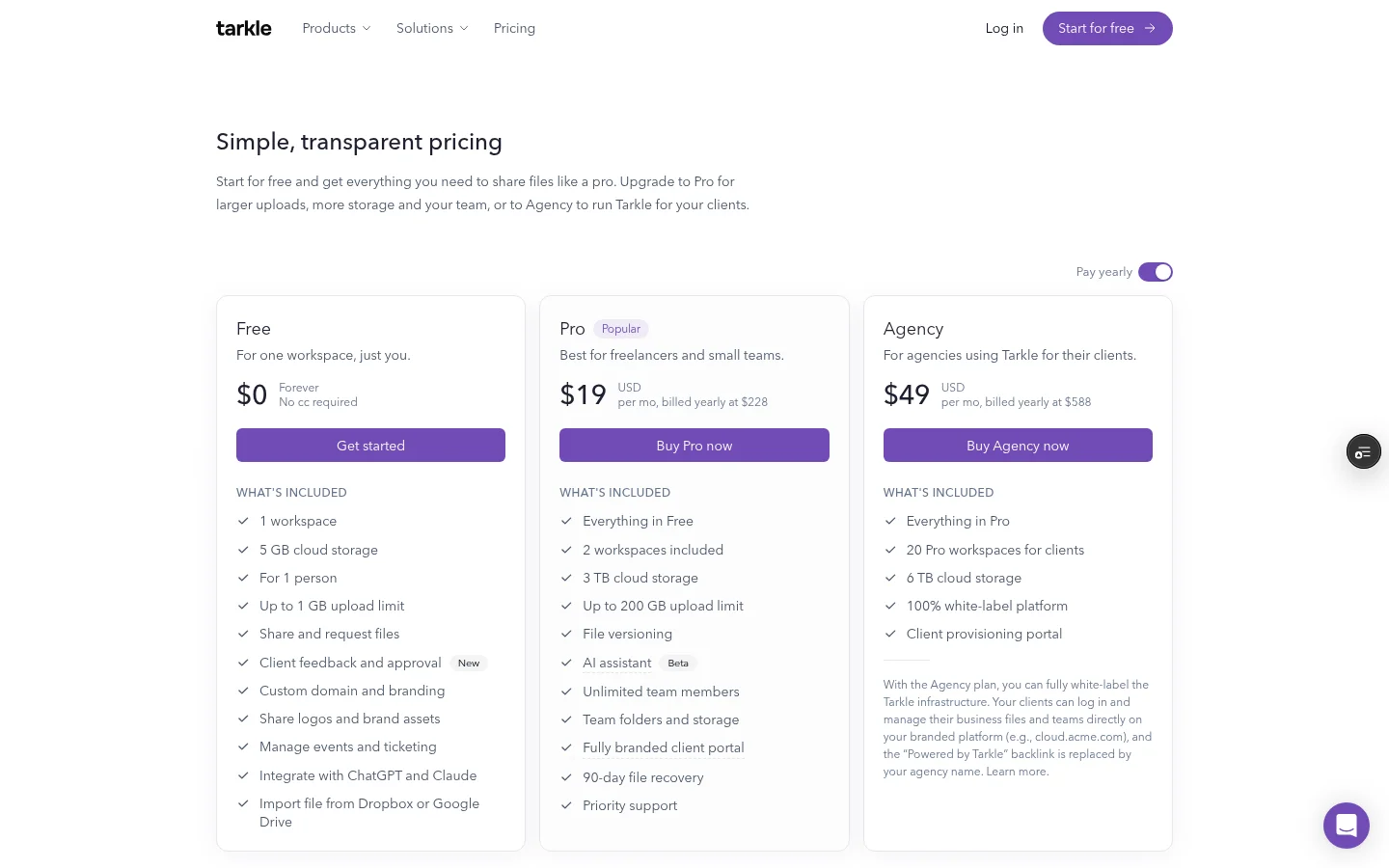
The Free plan includes 5 GB of storage, file sharing and file requests. The one-time plans include everything in Free. See Tarkle's plans and pricing, and compare the file sharing and file requests features for sending files and requesting uploads.
For client work that needs a portal as well as file sharing, the client portal is included on Pro and Agency. Portal use requires the workspace's portal setting to be enabled, and the client contact must have portal access enabled. Tarkle's published data-residency details list Europe, United States, Hong Kong and Australia. Read about where files are stored.
This comparison covers personal cloud storage and business file work without treating them as identical. The decision can include what happens after a file is stored: sharing it with a client, requesting files, or giving a client portal access.
What to remember about Tarkle
Tarkle's one-time purchase plans are Pro and Agency. The Free plan includes file sharing and file requests. Start for free.